
PC Photo Kiosk2.5 - Download
You'll be able to download in few seconds.
Publisher Description
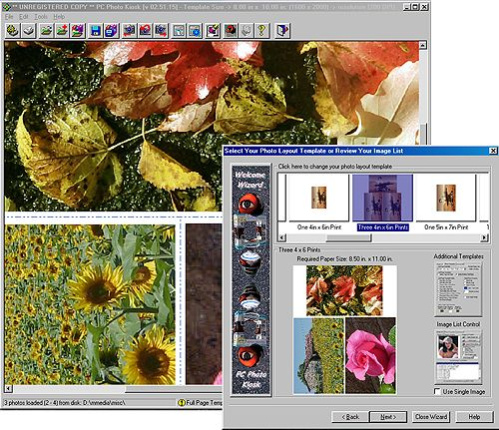
Process your digital photos in the comfort of your own home. Just like Photo Lab or Drug Store Kiosks, your first step is to select your images for printing. Once an image list is selected, the popup photo layout dialog gives you complete control over image selection, templates and filters using the built-in property sheet controls. You save MONEY, INK and TIME!
Key Features Include:
100% Zoom Preview Always Available - check photo image at full size at any time. Locate pixelation or blotches instantly!
Easy 3-Step Wizard - use the wizard and you're three clicks away from instant Kiosk printing!
Automatic resize, rotation and/or crop of images - never worry about photo size or resolution again. Simply select your photo template layout and PC Photo Kiosk does the rest.
Built-in photo templates - dozens of built-in templates for your selection. All standard photo print sizes supported including user selectable.
User selectable print resolution - You decide how much resolution you need to print any size photo - from 100 to 800 DPI (Dots Per Inch).
Multiple image filters such as grayscale, negative, emboss, brightness, contrast etc.
User configurable image lists of unlimited sizes. All popular file types supported such as BMP, PCX, TGA, TIFF, JPG, PNG etc.
Automatic Batch Print Operation - ANY series of templates selected in PC Photo Kiosk can be used to instantly create a batch operation. Print entire photo list with one keystroke. No complex scripts or programming needed. Simply point and click!
Automatic Contact Sheet Generation - Simply select the index sheet template, select your image directory and watch PC Photo Kiosk instantly create contact sheets from among THOUSANDS of images!
Built-in Electronic Photo Album - create, organize and display your own personal photo albums. No need to worry about directory structure anymore!
Simple and Easy User Interface - with large toolbar button controls.
About PC Photo Kiosk
This program is available in English. It was last updated on 29 September, 2026. PC Photo Kiosk is compatible with the following operating systems: Windows.
The company that develops PC Photo Kiosk is Ob1gui, Inc.. The latest version released by its developer is 2.5.
The download we have available for PC Photo Kiosk has a file size of 1.0 MB. Just click the green Download button above to start the downloading process. The program is listed on our website since 2004-04-07 and was downloaded 0 times. We have already checked if the download link is safe, however for your own protection we recommend that you scan the downloaded software with your antivirus. Your antivirus may detect the PC Photo Kiosk as malware if the download link is broken.
How to install PC Photo Kiosk on your Windows device:
- Click on the Download button on our website. This will start the download from the website of the developer.
- Once the PC Photo Kiosk is downloaded click on it to start the setup process (assuming you are on a desktop computer).
- When the installation is finished you should be able to see and run the program.
Program Details
System requirements
Download information
Pricing
Version History
version 2.5
posted on 2004-04-07
Added automatic program control wizard.
Disclaimer
External Download
We do not host PC Photo Kiosk on our servers. We did not scan it for viruses, adware, spyware or other type of malware. This app is hosted by the software publisher and passed their terms and conditions to be listed there. We recommend caution when installing it.
The external download link for PC Photo Kiosk is provided to you by apps112.com without any warranties, representations or guarantees of any kind, so access it at your own risk.
If you have questions regarding this particular app contact the publisher directly. For questions about the functionalities of apps112.com contact us.
